Thursday, 17 March 2011

Adding custom tab to the transaction vf01/vf02/vf03 item detail screen

1.Create a data element in SE11 and create an append structure and add it to VBRP table


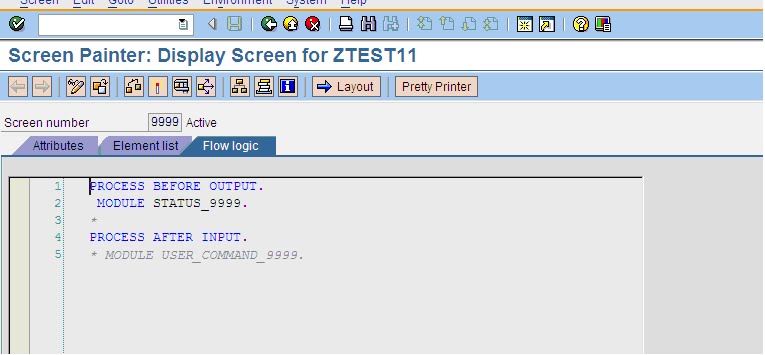
2.Create a program and screen using SE51


3.Add the below code so as to make the field in display mode when running the transaction VF03


4.Add the field from the dictionary structure VBRP


5.Save and activate the above program.

6.

Go to se80 and give the program name (SAPMV60A) of the vf01 transaction. In that go to screen -> 6002.

In the layout of 6002 we found the custom tab which has the function code 'PFCU'


7.

Go to MODULE PBO_6002.

In the 'MODULE PBO_6002' the subroutine PBO_6002_TABSTRIP_POS specifies the position of the tab.


8.
  • In order to activate the custom tab for this requirement which is having the function code 'PFCU'. The module CUST_ITEM_ACTIVATE needs to be executed.
  • This module is not being executed since the 'Active' is not equal to 'X'.
  • For this subroutine to be executed we need to write an enhancement, we have enhancement spots at the begin/end of the subroutine.


9.

Steps to write the code in the enhancement spots.

  • First to find the enhancement spots click on the spiral icon in the menu bar, and next click on the edit -> enhancement operations -> show implicit enhancement options and then click on spiral icon


10.

And implement the below logic to call the custom screen


Activate the enhancement and check in the vf01/vf02/vf03 you can find the custom tab with the custom fields.


Sunday, 18 January 2009

Creation-Change log for Custom Transaction

Creation of the change log for a custom transaction

1.Lets assume that we have a single table associated with this custom transaction.(Same process will be followed if there are multiple tables).

2.Go to transaction SCDO.

3.Create the object for that particular table name.

4.The update function module in the generation info is used to write the changes in CDHDR and CDPOS tables.


5.The table technical settings should be set to log the changes and check the Change document button at the data element level for the fields.

6.In the Custom transaction where you are making changes .
Select the old values from the custom table.

7.When updating the Custom table call the FM
Check if there is any difference between the old value and the new value you are currently updating into Custom table.
If there is a difference then call the below FM.
*No need to send any data into table l_i_cdtxt_chgcstprf.But keep clearing it.
*The object id l_v_object_id may be a concatenation of the key fields of the custom table.

CALL FUNCTION 'SWE_REQUESTER_TO_UPDATE'.

* FM is called to update the change log in database
CALL FUNCTION '/GLB/CHGCSTPRF_WRITE_DOCUMENT'
EXPORTING
objectid = l_v_object_id
tcode = sy-tcode
utime = sy-uzeit
udate = sy-datum
username = sy-uname
object_change_indicator = 'U'
upd_icdtxt_chgcstprf = 'U'
n_glb_ogtt_cstprf = l_wa_cstprf_new
o_glb_ogtt_cstprf = l_wa_cstprf_old
upd_glb_ogtt_cstprf = 'U'
TABLES
icdtxt_chgcstprf = l_i_cdtxt_chgcstprf.

This will update the data into CDHDR and CDPOS tables.

Regards,
Sasidhar

Call Browser from SAP

This program shows how to call the Browser from SAP.

*Global data declarations
CONSTANTS:
c_selected TYPE flag VALUE 'X'.

* SELECTION-SCREEN declarations
SELECTION-SCREEN BEGIN OF BLOCK blk1 WITH FRAME TITLE text-002. "Document Source Section
PARAMETERS:
rb_ossnt RADIOBUTTON GROUP grp1,
rb_sdn RADIOBUTTON GROUP grp1.
SELECTION-SCREEN END OF BLOCK blk1.

PARAMETERS:
p_dlink TYPE char40.

*The following is the selection screen.


*--------------------------------------------------------------------*
* S T A R T - O F - S E L E C T I O N *
*--------------------------------------------------------------------*

START-OF-SELECTION.

* Show document from Nestool/Peregrine/SAP Portal
PERFORM show_document_link.

*&---------------------------------------------------------------------*
*& Form SHOW_DOCUMENT_LINK
*&---------------------------------------------------------------------*
* Show document from SAP Portal/SDN
*----------------------------------------------------------------------*
* --> p1 text
* <-- p2 text
*----------------------------------------------------------------------*
FORM show_document_link.
* Local data declarations
DATA: l_v_url TYPE char0241.

* Display documents according to the selection made

CASE c_selected.

* Show SAP OSS Note
WHEN rb_ossnt.

CONCATENATE 'https://service.sap.com/sap/support/notes/'
p_dlink INTO l_v_url.

PERFORM call_browser USING l_v_url.

WHEN rb_sdn.

l_v_url = 'https://www.sdn.sap.com'.
PERFORM call_browser USING l_v_url.
ENDCASE.

ENDFORM. " SHOW_DOCUMENT_LINK *&---------------------------------------------------------------------*
*& Form CALL_BROWSER *&---------------------------------------------------------------------*
* text
*----------------------------------------------------------------------*
* -->P_L_V_DOCLINK text
*----------------------------------------------------------------------*
FORM call_browser USING fp_l_v_url TYPE char0241.

* Remove Gaps

CONDENSE fp_l_v_url NO-GAPS.

* Call browser to display the corresponding document.

CALL FUNCTION 'CALL_BROWSER'
EXPORTING
url = fp_l_v_url
new_window = c_selected
EXCEPTIONS
OTHERS = 6.

* In case of failure issue specific system message if raised otherwise
* give a generic error message.

IF sy-subrc <> 0.
IF NOT sy-msgid IS INITIAL.
MESSAGE ID sy-msgid
TYPE sy-msgty
NUMBER sy-msgno
WITH sy-msgv1
sy-msgv2
sy-msgv3
sy-msgv4.
ELSE.
* Show message: Error in calling the browser
MESSAGE 'Error in calling the browser' TYPE 'E'.
ENDIF.
ENDIF.

ENDFORM. " CALL_BROWSER

Sunday, 11 January 2009

Simple ALV report with all the Options

Hi,

This is a Simple ALV report which contains most of the options that can be done in ALV.

Data:v_vbeln type vbrk-vbeln.
TYPE-POOLS:slis.
select-options:s_vbeln for v_vbeln.
PARAMETERS:p_varnt TYPE slis_vari. "ALV variant
TYPES:BEGIN OF ty_vbrp,
vbeln TYPE vbeln_vf,
posnr TYPE posnr_vf,
matnr TYPE matnr,
fkimg TYPE fkimg,
vrkme TYPE vrkme,
END OF ty_vbrp.
DATA:l_wa_vbrp TYPE ty_vbrp.
TYPES:BEGIN OF ty_final,
box TYPE char1,
vbeln TYPE vbeln_vf,
posnr TYPE posnr_vf,
matnr TYPE matnr,
fkimg TYPE fkimg,
vrkme TYPE vrkme,
END OF ty_final.
DATA:i_final TYPE STANDARD TABLE OF ty_final,
l_wa_final TYPE ty_final.
DATA:i_vbrp TYPE STANDARD TABLE OF ty_vbrp.
* Variables used for variant declaration
DATA: v_variant TYPE disvariant, "Variant
v_variant_value TYPE disvariant, "Variant
v_save(1) TYPE c VALUE 'A'. " For Storing VALUE 'A'
CONSTANTS: c_a TYPE char1 VALUE 'A', "Value 'A'
c_form_top TYPE slis_formname VALUE 'TOP_OF_PAGE'.
INITIALIZATION.
* Sends variant to ALV
PERFORM f_layout_variant.
AT SELECTION-SCREEN.
*Checks whether user defined variant already exists
PERFORM f_check_variant.
AT SELECTION-SCREEN ON VALUE-REQUEST FOR p_varnt.
* Help request for variant value
* To get variant defined for selection
PERFORM f4_for_variant.
START-OF-SELECTION.
SELECT vbeln posnr matnr fkimg vrkme
FROM vbrp INTO TABLE i_vbrp
WHERE vbeln in s_vbeln.
LOOP AT i_vbrp INTO l_wa_vbrp.
l_wa_final-vbeln = l_wa_vbrp-vbeln.
l_wa_final-posnr = l_wa_vbrp-posnr.
l_wa_final-matnr = l_wa_vbrp-matnr.
l_wa_final-fkimg = l_wa_vbrp-fkimg.
l_wa_final-vrkme = l_wa_vbrp-vrkme.
APPEND l_wa_final TO i_final.
ENDLOOP.
DATA:fp_i_fcat TYPE slis_t_fieldcat_alv,
wa_fcat TYPE slis_fieldcat_alv.
CONSTANTS:c_outputlen15 TYPE dd03p-outputlen VALUE '15'.
END-OF-SELECTION.
wa_fcat-col_pos = '1'.
wa_fcat-fieldname = 'BOX'.
wa_fcat-tabname = 'I_FINAL'.
wa_fcat-checkbox = 'X'.
*wa_fcat-input = 'X'.
wa_fcat-edit = 'X'.
wa_fcat-fix_column = 'X'.
wa_fcat-outputlen = '1'.
APPEND wa_fcat TO fp_i_fcat.
CLEAR wa_fcat.
wa_fcat-col_pos = '2'.
wa_fcat-fieldname = 'VBELN'.
wa_fcat-tabname = 'I_FINAL'.
wa_fcat-outputlen = c_outputlen15.
wa_fcat-seltext_l = 'Sales doc'.
APPEND wa_fcat TO fp_i_fcat.
CLEAR wa_fcat.
wa_fcat-col_pos = '3'.
wa_fcat-fieldname = 'POSNR'.
wa_fcat-tabname = 'I_FINAL'.
wa_fcat-outputlen = c_outputlen15.
wa_fcat-seltext_l = 'Item No'.
APPEND wa_fcat TO fp_i_fcat.
CLEAR wa_fcat.
wa_fcat-col_pos = '4'.
wa_fcat-fieldname = 'MATNR'.
wa_fcat-tabname = 'I_FINAL'.
wa_fcat-outputlen = c_outputlen15.
wa_fcat-seltext_l = 'Material'.
APPEND wa_fcat TO fp_i_fcat.
CLEAR wa_fcat.
wa_fcat-col_pos = '5'.
wa_fcat-fieldname = 'FKIMG'.
wa_fcat-tabname = 'I_FINAL'.
wa_fcat-outputlen = c_outputlen15.
wa_fcat-seltext_l = 'Quantity'.
*the option do_sum is needed if we want to find the subtotal
*After filling this we have to pass the option subtot in it_sort.
wa_fcat-do_sum = 'X'. " ='C' to calculate the avg
APPEND wa_fcat TO fp_i_fcat.
CLEAR wa_fcat.
wa_fcat-col_pos = '6'.
wa_fcat-fieldname = 'VRKME'.
wa_fcat-tabname = 'I_FINAL'.
wa_fcat-outputlen = c_outputlen15.
wa_fcat-seltext_l = 'Unit'.
APPEND wa_fcat TO fp_i_fcat.
CLEAR wa_fcat.
CONSTANTS:c_ucomm TYPE slis_formname VALUE 'USER_COMM',
c_sub_pf_set TYPE slis_formname VALUE 'SUB_PF_SET'.
DATA:v_repid TYPE repid,
l_wa_set TYPE lvc_s_glay. "Grid setting for check
*CALL BACK PROGRAM IS MUST IF WE WANT TO SET OUR OWN PF STATUS
v_repid = sy-repid.
* Set the grid setting for editable ALV
*this is must if the check box ticked on the selection screen needs to be updated in the
*internal table I_FINAL
l_wa_set-edt_cll_cb = 'X'.
*to facilitate the sorting of the internal table.
DATA: wa_sort TYPE slis_sortinfo_alv,
i_sort TYPE slis_t_sortinfo_alv.
*wa_sort-spos = '01'. "Works only if box is not there
wa_sort-fieldname = 'POSNR'.
wa_sort-tabname = 'I_FINAL'.
* wa_sort-up = 'X'.
wa_sort-down = 'X'.
* wa_sort-subtot = 'X'.
* Append work area
APPEND wa_sort TO i_sort.
CALL FUNCTION 'REUSE_ALV_GRID_DISPLAY'
EXPORTING
* I_INTERFACE_CHECK = ' '
* I_BYPASSING_BUFFER = ' '
* I_BUFFER_ACTIVE = ' '
i_callback_program = v_repid
i_callback_pf_status_set = c_sub_pf_set
i_callback_user_command = c_ucomm
i_callback_top_of_page = c_form_top
* I_CALLBACK_HTML_TOP_OF_PAGE = ' '
* I_CALLBACK_HTML_END_OF_LIST = ' '
* I_STRUCTURE_NAME =
* I_BACKGROUND_ID = ' '
* I_GRID_TITLE =
i_grid_settings = l_wa_set
* IS_LAYOUT =
it_fieldcat = fp_i_fcat
* IT_EXCLUDING =
* IT_SPECIAL_GROUPS =
it_sort = i_sort
* IT_FILTER =
* IS_SEL_HIDE =
i_default = 'X'
i_save = c_a "Needs to be passed to save the variant in the alv output
is_variant = v_variant_value "to send the variant value from selection screen
* IT_EVENTS =
* IT_EVENT_EXIT =
* IS_PRINT =
* IS_REPREP_ID =
* I_SCREEN_START_COLUMN = 0
* I_SCREEN_START_LINE = 0
* I_SCREEN_END_COLUMN = 0
* I_SCREEN_END_LINE = 0
* IT_ALV_GRAPHICS =
* IT_HYPERLINK =
* IT_ADD_FIELDCAT =
* IT_EXCEPT_QINFO =
* I_HTML_HEIGHT_TOP =
* I_HTML_HEIGHT_END =
* IMPORTING
* E_EXIT_CAUSED_BY_CALLER =
* ES_EXIT_CAUSED_BY_USER =
TABLES
t_outtab = i_final
EXCEPTIONS
program_error = 1
OTHERS = 2
.
IF sy-subrc <> 0.
MESSAGE ID sy-msgid TYPE sy-msgty NUMBER sy-msgno
WITH sy-msgv1 sy-msgv2 sy-msgv3 sy-msgv4.
ENDIF.
*&---------------------------------------------------------------------*
*& Form user_comm
*&---------------------------------------------------------------------*
* text
*----------------------------------------------------------------------*
* -->FP_UCOMM text
* -->FP_SELFIELD text
*----------------------------------------------------------------------*
FORM user_comm USING fp_ucomm TYPE syucomm
fp_selfield TYPE slis_selfield.
CASE fp_ucomm.
WHEN 'SASI1'.
DELETE i_final INDEX fp_selfield-tabindex.
*to refresh the screen.
fp_selfield-refresh = 'X'.
ENDCASE.
ENDFORM. "USER_COMM
*---------------------------------------------------------------------*
* FORM sub_pf_set *
*---------------------------------------------------------------------*
* PF status routine
*---------------------------------------------------------------------*
FORM sub_pf_set USING fp_rt_extab TYPE slis_t_extab.
*To set the standard PF status.
*Transaction SE41
*SAPLSLVC program- status STANDARD
SET PF-STATUS 'SASI1'.
ENDFORM. "sub_pf_set
*---------------------------------------------------------------------*
* FORM TOP_OF_PAGE *
*---------------------------------------------------------------------*
* Top of Page routine
*---------------------------------------------------------------------*
FORM top_of_page.
DATA:i_list_top_of_page TYPE slis_t_listheader,
rec_head TYPE slis_listheader.
CLEAR rec_head.
rec_head-typ = 'S'.
rec_head-key = 'SASI'.
rec_head-info = 'To display the header in the AlV output'.
APPEND rec_head TO i_list_top_of_page.
CLEAR rec_head.
* Write the top of page of the ALV using function module
CALL FUNCTION 'REUSE_ALV_COMMENTARY_WRITE'
EXPORTING
it_list_commentary = i_list_top_of_page.
ENDFORM. "TOP_OF_PAGE
*&---------------------------------------------------------------------*
*& Form f_layout_variant
*&---------------------------------------------------------------------*
* text
*----------------------------------------------------------------------*
* --> p1 text
* <-- p2 text
*----------------------------------------------------------------------*
FORM f_layout_variant .
CLEAR v_variant_value.
v_variant_value-report = sy-repid.
PERFORM f_get_default_variant.
ENDFORM. " f_layout_variant
*&---------------------------------------------------------------------*
*& Form f_get_default_variant
*&---------------------------------------------------------------------*
* text
*----------------------------------------------------------------------*
* --> p1 text
* <-- p2 text
*----------------------------------------------------------------------*
FORM f_get_default_variant .
v_variant = v_variant_value.
CALL FUNCTION 'REUSE_ALV_VARIANT_DEFAULT_GET'
EXPORTING
i_save = c_a
CHANGING
cs_variant = v_variant
EXCEPTIONS
wrong_input = 1
not_found = 2
program_error = 3
OTHERS = 4.
IF sy-subrc <> 0.
p_varnt = v_variant-variant.
ENDIF.
ENDFORM. " f_get_default_variant
*&---------------------------------------------------------------------*
*& Form f_check_variant
*&---------------------------------------------------------------------*
* text
*----------------------------------------------------------------------*
* --> p1 text
* <-- p2 text
*----------------------------------------------------------------------*
FORM f_check_variant .
IF NOT p_varnt IS INITIAL.
MOVE v_variant_value TO v_variant.
MOVE p_varnt TO v_variant-variant.
*Check whether the user entered variant exists
*through function module,REUSE_ALV_VARIANT_EXISTENCE.
*If the variant does not exist issue appropriate
*error message.
CALL FUNCTION 'REUSE_ALV_VARIANT_EXISTENCE'
EXPORTING
i_save = c_a
CHANGING
cs_variant = v_variant
EXCEPTIONS
wrong_input = 1
not_found = 2
program_error = 3
OTHERS = 4.
IF sy-subrc <> 0.
* MESSAGE e501. "Variant does not exist.
ENDIF.
v_variant_value = v_variant.
ELSE.
CLEAR v_variant_value.
v_variant_value-report = sy-repid.
ENDIF.
ENDFORM. " f_check_variant
*&---------------------------------------------------------------------*
*& Form f4_for_variant
*&---------------------------------------------------------------------*
* text
*----------------------------------------------------------------------*
* --> p1 text
* <-- p2 text
*----------------------------------------------------------------------*
FORM f4_for_variant .
DATA: l_exit(1) TYPE c. " For storing exit value
v_variant = v_variant_value.
CALL FUNCTION 'REUSE_ALV_VARIANT_F4'
EXPORTING
is_variant = v_variant_value
i_save = v_save
IMPORTING
e_exit = l_exit
es_variant = v_variant
EXCEPTIONS
not_found = 2.
IF sy-subrc EQ 0 AND l_exit = space.
p_varnt = v_variant-variant.
ENDIF.
ENDFORM. " f4_for_variant

Determination of the table structure dynamically

TYPE-POOLS: slis.
DATA: it_fcat TYPE slis_t_fieldcat_alv,
is_fcat LIKE LINE OF it_fcat.
DATA: it_fieldcat TYPE lvc_t_fcat,
is_fieldcat LIKE LINE OF it_fieldcat.
DATA: new_table TYPE REF TO data.
DATA: new_line TYPE REF TO data.
FIELD-SYMBOLS: TYPE ANY TABLE,
TYPE ANY,
TYPE ANY.
*Build fieldcat
CALL FUNCTION 'REUSE_ALV_FIELDCATALOG_MERGE'
EXPORTING
i_structure_name = 'SYST'
CHANGING
ct_fieldcat = it_fcat[].
LOOP AT it_fcat INTO is_fcat WHERE NOT reptext_ddic IS INITIAL.
MOVE-CORRESPONDING is_fcat TO is_fieldcat.
is_fieldcat-fieldname = is_fcat-fieldname.
is_fieldcat-ref_field = is_fcat-fieldname.
is_fieldcat-ref_table = is_fcat-ref_tabname.
APPEND is_fieldcat TO it_fieldcat.
ENDLOOP.

*Create a new Table
CALL METHOD cl_alv_table_create=>create_dynamic_table
EXPORTING
it_fieldcatalog = it_fieldcat
IMPORTING
ep_table = new_table.

*Create a new Line with the same structure of the table.
ASSIGN new_table->* TO .
CREATE DATA new_line LIKE LINE OF .
ASSIGN new_line->* TO .

*Test it...
DO 30 TIMES.
ASSIGN COMPONENT 'SUBRC' OF STRUCTURE TO .
= sy-index.
INSERT INTO TABLE .
ENDDO.

LOOP AT ASSIGNING .
ASSIGN COMPONENT 'SUBRC' OF STRUCTURE TO .
WRITE .
ENDLOOP.

call transaction in a new task

DATA: msg_text(80) TYPE c, "Message text
itab_spa TYPE STANDARD TABLE OF rfc_spagpa,
wa_spa TYPE rfc_spagpa.

* Fill out parameters
wa_spa-parid = 'AUN'.
wa_spa-parval = '1234567890'. "Fill sales order number
APPEND wa_spa TO itab_spa.


* Create a new session
* Asynchronous call to Transaction VA03 -->
CALL FUNCTION 'ABAP4_CALL_TRANSACTION' STARTING NEW TASK 'SORD'
DESTINATION 'NONE'
EXPORTING
tcode = 'VA03'
SKIP_SCREEN = 'X'
* MODE_VAL = 'A'
* UPDATE_VAL = 'A'
* IMPORTING
* SUBRC =
TABLES
* USING_TAB =
SPAGPA_TAB = itab_spa
* MESS_TAB =
EXCEPTIONS
CALL_TRANSACTION_DENIED = 1
TCODE_INVALID = 2
OTHERS = 3
.
IF sy-subrc NE 0.
WRITE: msg_text.
ELSE.
WRITE: 'Call transaction successful'.
ENDIF.

Dynamic determination of Headings for the file

*declare a table with the field name and its description
TYPES:BEGIN OF ty_test1,
fieldname TYPE char10,
desc TYPE char12,
END OF ty_test1.
*declare a second internal table with the actual fileds
TYPES:BEGIN OF ty_test2,
initial TYPE char10,
lastname TYPE char12,
firstname TYPE char12,
END OF ty_test2.
DATA:ls_fldnam TYPE ty_test1.
DATA:i_test1 TYPE STANDARD TABLE OF ty_test1,
wa_test1 TYPE ty_test1,
i_test2 TYPE STANDARD TABLE OF ty_test2,
wa_test2 TYPE ty_test2.
DATA: lf_field(40) TYPE c.
FIELD-SYMBOLS: TYPE ANY.

*give the field name from second table into first table fields and give the desc too
wa_test1-fieldname = 'INITIAL'.
wa_test1-desc = 'INITIAL'.
APPEND wa_test1 TO i_test1.
wa_test1-fieldname = 'FIRSTNAME'.
wa_test1-desc = 'FIRSTNAME'.
APPEND wa_test1 TO i_test1.
*in the final internal table i_test2 we want to get the description of the only two fileds
*these should appear in the final output when downloaded.
*the desc's will appear only for those fileds that are defined above.
LOOP AT i_test1 INTO ls_fldnam.
CONCATENATE 'wa_test2-' ls_fldnam-fieldname
INTO lf_field.
ASSIGN (lf_field) TO .
IF sy-subrc = 0.
= ls_fldnam-desc.
ENDIF.
ENDLOOP.
APPEND wa_test2 TO i_test2.
wa_test2-initial = 'SASI'.
wa_test2-firstname = 'YALAMANCHILI'.
wa_test2-lastname = 'xxx'.
APPEND wa_test2 TO i_test2.
CLEAR wa_test2.
wa_test2-initial = 'KANNAN'.
wa_test2-firstname = 'SENTHIL'.
APPEND wa_test2 TO i_test2.
* download queue-data
CALL FUNCTION 'GUI_DOWNLOAD'
EXPORTING
filename = 'C:\Documents and Settings\Administrator\Desktop\sasi.txt'
filetype = 'ASC'
write_field_separator = 'X'
TABLES
data_tab = i_test2
EXCEPTIONS
file_write_error = 1
no_batch = 2
gui_refuse_filetransfer = 3
invalid_type = 4
no_authority = 5
unknown_error = 6
header_not_allowed = 7
separator_not_allowed = 8
filesize_not_allowed = 9
header_too_long = 10
dp_error_create = 11
dp_error_send = 12
dp_error_write = 13
unknown_dp_error = 14
access_denied = 15
dp_out_of_memory = 16
disk_full = 17
dp_timeout = 18
file_not_found = 19
dataprovider_exception = 20
control_flush_error = 21
OTHERS = 22.
IF sy-subrc <> 0.
* MESSAGE e008 WITH sy-subrc.
ENDIF.